How to pay an invoice and what happens if it is late
Short answer: Open the invoice in the Client Area (or select Pay invoice on the Your plan card in the Game Panel), select Pay, choose a payment method and select Pay Now. Renewal invoices arrive 7 days before the due date. If an invoice is still unpaid 5 days after the due date, the server is suspended; after 14 days it is deleted.
Before you begin
Section titled “Before you begin”- You need: your Client Area account (https://client.hostitcreateit.com).
- Have ready: a card, PayPal, or account credit.
- Time needed: 2 minutes.
What this guide covers
Section titled “What this guide covers”- Paying an invoice
- Using account credit
- What happens if you pay late
-
Open the invoice:
- in the Client Area, go to Invoices and select the invoice, or
- in the Game Panel, on your server’s Console page, select Pay invoice on the Your plan card.
-
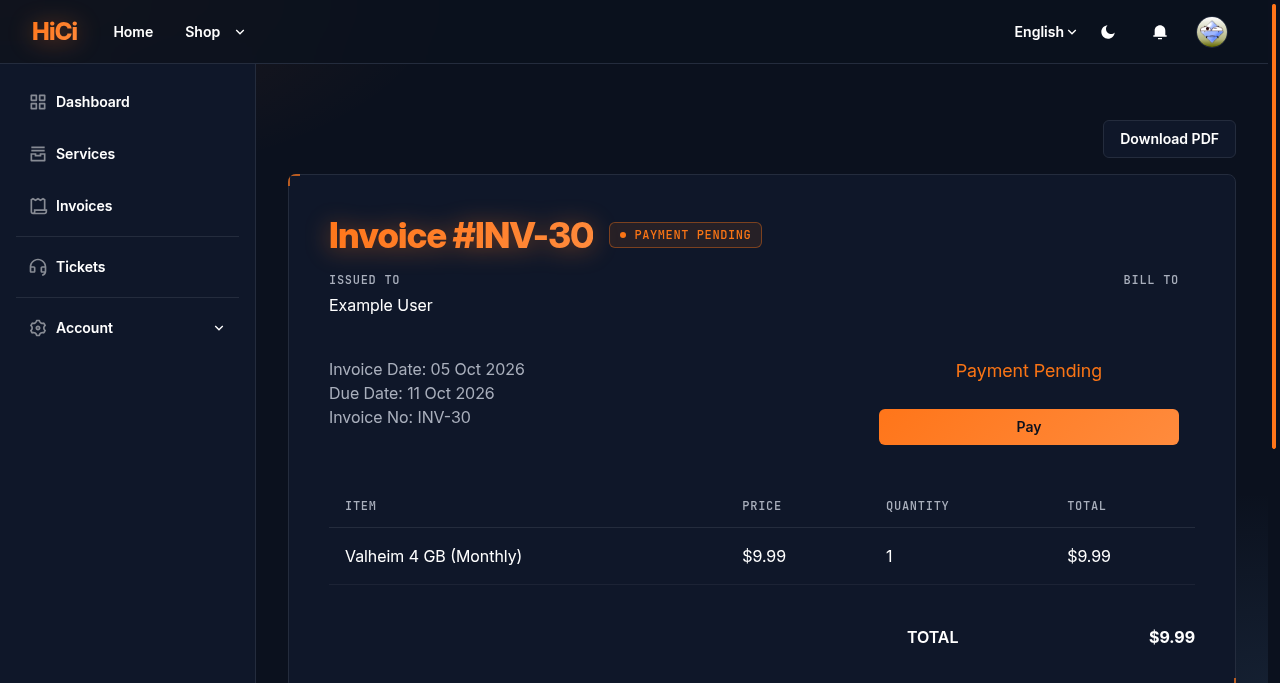
Check the items and the Due Date.
-
Select Pay.
-
Choose how to pay: a saved payment method, a one-time payment, or Pay with Credits if you have account credit.
-
Select Pay Now and follow the payment provider’s steps.
What happens if you pay late
Section titled “What happens if you pay late”| When | What happens |
|---|---|
| 7 days before the due date | The renewal invoice is created and emailed |
| Due date | Payment is due |
| 5 days after the due date | The server is Suspended: stopped and locked |
| 14 days after the due date | The server, its files and its backups are deleted |
Paying at any point before deletion brings a suspended server back automatically. These checks run once a day at 00:00 UTC. Full rules: our Terms of Service, section 2 (https://hostitcreateit.com/terms).
Expected result
Section titled “Expected result”The invoice shows Paid, and you get a confirmation email.
Common mistakes
Section titled “Common mistakes”- Paying twice while a payment is processing. Wait for the first one to finish.
- Ignoring the invoice email because the server still works. The server keeps running until 5 days after the due date, then stops.
Troubleshooting
Section titled “Troubleshooting”| What you see | What it means | What to do |
|---|---|---|
| Payment Pending for more than an hour | The payment provider hasn’t confirmed | Check your bank or PayPal; contact support with the invoice number |
| Payment failed | Declined by your bank or provider | Try another method, or contact your bank |
| Paid, server still suspended after 30 minutes | Unsuspend didn’t run | Contact support with the invoice number |
When to contact support
Section titled “When to contact support”Contact support if you were charged but the invoice still isn’t Paid after an hour, or if you were charged twice. Include the invoice number and the payment date (never card details). See How to contact support with useful diagnostic information.
Related guides
Section titled “Related guides”Last reviewed: 2026-10-05 · Applies to: Client Area (1.5.8) · Game Panel (hici 0.4.2)