Giving a friend or moderator access with subusers
Short answer: Go to [Your Server] > Users and select New User. Enter their email in User Email, tick only the permissions they need, and select Invite User. To take access away later, delete them from the same page.
A subuser is someone with their own Game Panel login and limited access to your server.
Before you begin
Section titled “Before you begin”- You need: to be the server’s owner (or a subuser allowed to manage users).
- Have ready: the email address of the person you’re adding.
- Time needed: 3 minutes.
What this guide covers
Section titled “What this guide covers”- Adding a subuser
- Choosing permissions
- Removing access
Add a subuser
Section titled “Add a subuser”-
Go to [Game Panel] > [Your Server] > Users.
-
Select New User. The Create new subuser window opens.
-
Enter their email address in User Email.
-
Tick the permissions they need (see below). The box next to a group’s name, such as control, ticks everything in that group.
-
Select Invite User at the top of the window.
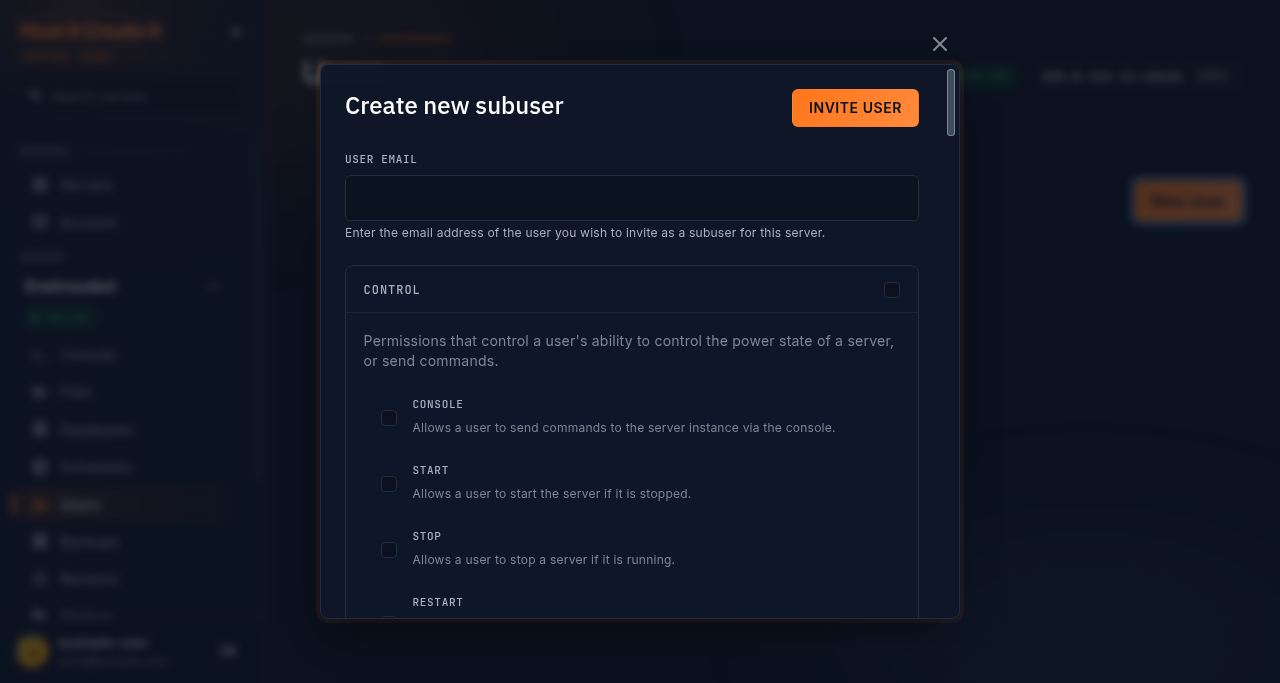
If they don’t have a Game Panel account yet, one is created and they get an email to set their password. The server then appears in their Servers list.
Choose permissions
Section titled “Choose permissions”Permissions are grouped by area. Some common setups:
| Role | Tick |
|---|---|
| Restart only | control: console, start, stop, restart |
| Moderator | control (all), file: read, read-content |
| Co-admin | Everything except user and settings |
Change or remove access
Section titled “Change or remove access”- On Users, select the subuser to edit their permissions, then Save.
- To remove someone, select the delete option next to them and confirm Delete this subuser?. They lose access straight away.
Expected result
Section titled “Expected result”The person signs in at https://panel.hostitcreateit.com and sees your server, with only the pages you allowed.
Common mistakes
Section titled “Common mistakes”- Sharing your own login instead. You can’t limit or remove a shared login without changing your password.
- Giving everything to everyone. Start with the least access and add more when needed.
- Expecting subusers to see billing or Get help. The Your plan card and Get help are for the owner only.
Troubleshooting
Section titled “Troubleshooting”| What you see | What it means | What to do |
|---|---|---|
| Invite email didn’t arrive | Spam filter, or a typo in the address | Check the address on Users; ask them to use Forgot password? |
| Subuser can’t see a page | They don’t have that permission | Edit their permissions |
| Subuser can’t use SFTP | No sftp permission, or they haven’t set a Game Panel password | Add the permission; they use Forgot password? to set one |
When to contact support
Section titled “When to contact support”Contact support if someone still has access after you removed them, or you can’t open Users on your own server. See How to contact support with useful diagnostic information.
Related guides
Section titled “Related guides”Last reviewed: 2026-10-05 · Applies to: Game Panel (hici 0.4.2)